
Homerun Clash
HAEGIN Co., Ltd.Sports
4.414.70K Reviews
- Version
- 6.4.2.0
- Installs
- 5.00M
- Age Rating
- Everyone 10+
Screenshots





Our Review of Homerun Clash
 Analysis by Appyee
I can see Homerun Clash working best as a quick shared-device game: one person takes a few swings, then passes the phone or tablet to someone else. That makes it an easy fit for a short break at home, though I would treat it as a turn-taking game rather than assume that two people can share one match or one account in a particular way.
Passing the device without passing the account
On a shared phone, the simplest boundary is to decide whose game session is active before anyone starts. A sibling, partner, or visiting friend can take a turn, but progress and any account-linked activity may belong to the person signed in. I would avoid letting casual guests make purchases or change settings, especially when the device is already used for other apps. That is sensible shared-device practice, not a special family feature of this game.
There is also a practical distinction between handing over the device and coordinating separate players. The game’s appeal is built around competition, but a household should not assume that everyone’s progress, unlocks, or club participation will be shared. If several people want to play regularly, agree in advance whether each person will use their own setup or whether the device is simply being passed around for occasional turns. That small conversation prevents the common disappointment of expecting one person’s progress to count for everybody.
A small routine for short sessions
For a quick after-school or after-dinner break, I’d keep the routine simple: choose who is playing, set a reasonable stopping point, and pass the device when that turn ends. The concise batting focus makes it easier to fit into a spare moment than a long sports simulation with full innings, team management, and a drawn-out match structure. That is also the main trade-off: if your household wants to recreate the broader rhythm of baseball, this is not the same kind of experience.
Before starting, it helps to check whether the player wants a relaxed practice-like session or the pressure of a live contest. A real-time match can feel more demanding than a solo activity because another player is involved. I would not start one if someone has only a few seconds before needing to leave or hand over the device; a self-contained activity is a better choice when interruptions are likely.
Who will enjoy the format—and who may not
I’d recommend it to people who like the satisfying moment of timing a hit and seeing whether it becomes a home run, but who do not need the full rules and tactical depth of a baseball game. It can also suit friends or relatives who enjoy comparing quick results. Someone who wants team lineups, defensive play, season management, or a realistic match simulation should look at a more traditional baseball title instead.
Compared with many sports games, the focus here is unusually narrow: batting is the main event, not one phase in a complete game. That makes the action easy to understand, but it also means repeated sessions can feel similar if the player is not motivated by timing, score-chasing, competition, or character progression. I would try a few rounds before spending money to see whether that central loop stays enjoyable for you.
What to consider before making it a household game
The game is free to download, while optional in-app purchases range from $0.99 to $109.99 per item. I would treat that range as a reason to set a clear purchase rule on any shared device, not as a reason to buy anything to enjoy the basic idea. If a younger player is involved, an adult should handle purchase decisions and make sure the device’s usual purchase protections are in place.
The age rating is Everyone 10+, so I would use that as a starting point when deciding whether it suits a child, rather than assuming that every household will make the same call. The competitive setting, online interaction, and purchase options are worth discussing with younger players. I would also agree on when play is appropriate and how long a session should last; the quick-match appeal can make it easy to start another round.
What is Homerun Clash?
Picture this: you’re in the middle of a packed stadium, the crowd is roaring, and it’s your turn at bat. That’s the vibe you get with Homerun Clash. This game is a fast-paced, multiplayer baseball game that focuses on—you guessed it—hitting home runs. It’s all about timing and precision as you go head-to-head with players from around the world. The goal? Smash as many home runs as you can and outscore your opponents.
Gameplay Mechanics
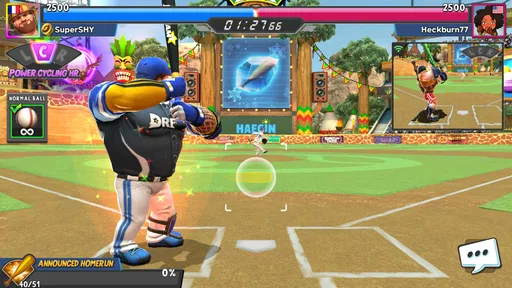
The gameplay is straightforward yet addictive. You’ll be entering different arenas, each with its own unique environment and challenges. The controls are intuitive: you pull back, aim, and release to swing your bat. It’s all about getting the timing just right to make sure the ball soars out of the park. Trust me, once you get the hang of it, you’ll be hooked!
There are various modes to keep things interesting. You can dive into the Clash Mode, where you face off against real players in real-time. Or, if you’re feeling strategic, you can try the Battle Royale mode, where the last player standing wins. Each mode offers a different experience, so there’s never a dull moment.
For a household turn-taking session, I’d resist the urge to judge a player by one lucky hit or one badly timed swing. The useful comparison is how each person handles the timing over several turns, and whether they prefer the direct head-to-head pressure or a mode where survival matters. Switching modes can also help a group discover which kind of competition feels fun rather than frustrating.
One practical way to improve is to focus on the release timing before worrying about every other part of the swing. If a player keeps making weak contact, changing several things at once makes it hard to tell what helped. I’d make one adjustment, play a few attempts, then decide whether the result feels more controlled. That keeps the learning process manageable, especially for someone who has just picked up the device.
Because the action is competitive, network interruptions or a sudden need to stop can be more annoying during a live contest than during a casual solo game. I’d save real-time play for moments when the connection is steady and nobody is about to reclaim the device. If the household is sharing one screen in a busy room, taking turns between matches is a safer plan than trying to coordinate a handoff mid-round.
Character Customization and Upgrades
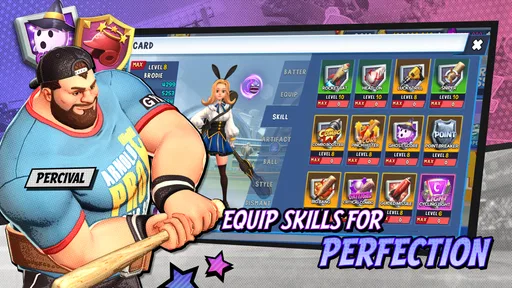
One of the coolest features is the character customization. You start with a basic character, but as you progress, you can unlock new players and upgrade their stats. This includes improving their power, accuracy, and more. Plus, you can deck them out in stylish gear which doesn’t just look cool but also boosts your performance. It’s a great way to keep things fresh and personalized.
For shared use, customization makes ownership boundaries worth thinking about: if one person has invested time in a character, another player may not want to experiment with that setup. I’d let the account owner decide before anyone spends resources or changes a preferred build. A useful approach is to treat upgrades as deliberate choices rather than tapping through every prompt; concentrating on the attributes that suit your own timing gives progression a clearer purpose.
Progression can make the game more engaging, but it also creates a difference between a new player and someone who has played for longer. That matters when an experienced household member challenges a beginner: the result may reflect more than batting skill. For a fairer friendly comparison, take turns using the same device and focus on learning the controls, or agree that the point is entertainment rather than a strict test of who is best.
Graphics and Sound
The graphics are vibrant and engaging, with each stadium bringing a unique flair. Whether you’re hitting homers in a classic baseball park or a futuristic arena, the visuals are top-notch. And let’s not forget about the sound effects! The crack of the bat, the cheer of the crowd—it all adds to the immersive experience that keeps you coming back for more.
That lively presentation is part of the fun, but it may not suit every setting. If someone is playing in a quiet room, on public transport, or while another person is trying to concentrate, lowering or muting the sound is an easy courtesy. I would also avoid judging the game’s overall feel from a single quick session on a small screen: the visual effects are energetic, and some players will find that exciting while others prefer a calmer sports game.
Community and Competition
What makes Homerun Clash stand out is its community. The game is designed to be social, allowing you to join clubs, chat with other players, and compete in club leagues. It’s a blast to see how you measure up against others, and the competitive spirit is alive and well. Plus, regular events and tournaments keep the gameplay exciting and rewarding.
That social side is a reason to think about account boundaries before a shared device becomes a shared routine. Club membership and conversations are personal to the player using the account, so I would not let a younger family member post or interact on someone else’s behalf without checking first. In a household where several people enjoy the game, it is better to agree who handles club activity than to assume that every player wants the same level of social involvement.
There is a difference between enjoying competition with people you know and joining a wider player community. The first can make a quick session feel like a friendly challenge; the second may involve interaction with people outside the household. If a player is uncomfortable with that, they can focus on the batting and competition aspects that suit them and let an adult help decide how to approach social features. I would not choose this over an offline sports game for someone who specifically wants no online interaction.
Release, access, and expectations
HAEGIN Co., Ltd. developed this sports game, which was released on October 1, 2018. It has a 4.4 average from around 118,000 ratings and more than 5 million installs. The current version is 6.4.2.0, and it requires Android 7.1 or later. Those figures suggest an established audience, but popularity alone does not tell me whether its particular batting loop will suit a new player.
It is free to start, and its Everyone 10+ age rating gives households a useful point of reference. The purchase range is wide, so I would not leave spending decisions to a child or to whoever happens to be holding the shared phone. A simple rule—ask the account owner before any purchase—keeps an entertaining turn-taking game from becoming an unexpected expense.
If someone asks whether it is suitable for a first sports game, my answer is yes when they mainly want quick batting action and are comfortable with competition. It is less suitable as a first introduction to baseball’s full rules, because the emphasis is on hitting and scoring rather than playing every part of the sport. For that, a more complete baseball simulation or a real-world game with a simple rules guide will teach more.
Final Thoughts
So, is Homerun Clash worth your time? If you’re into sports games and love a good competitive challenge, I’d say absolutely. The combination of simple mechanics, engaging gameplay, and a vibrant community makes it a home run in my book. Whether you’re a casual player or a die-hard baseball fan, this game has something for everyone. So grab your virtual bat, and let’s see how many homers you can hit!
Ready to step up to the plate? You can download Homerun Clash from the App Store or Google Play and start your journey to becoming a home run legend. Happy gaming!
My household verdict is that this is an easy game to share casually, provided everyone understands whose account is being used and who is allowed to make changes or purchases. I’d recommend it to a family member who likes fast, competitive batting and is happy to learn through repeated attempts. I’d skip it for someone who wants a complete baseball match, an entirely offline experience, or a game with no purchase prompts to manage.
When a friend asks whether it is worth trying before committing, I’d say yes: the free entry makes it reasonable to test the core action, while the optional purchases are best treated as a separate decision. Give it a few sessions, see whether the timing challenge stays satisfying, and only then decide whether the character progression and social competition add enough to your routine. That is the fairest way to find out if it belongs on your device.
Verdict
Strengths of Homerun Clash
- Engaging multiplayer battles.
- Intuitive controls for easy play.
- Regular updates with new content.
- Vibrant graphics and animations.
- Global leaderboards for competition.
Limitations of Homerun Clash
- Requires stable internet connection.
- In-app purchases can be pricey.
- Occasional matchmaking delays.
- Limited offline gameplay options.
- Some ads between matches.
Other Releases by HAEGIN Co., Ltd.
View All
Extreme Golf
Sports4.5
Similar Picks in This Category
View All
8 Ball Pool
Miniclip.com4.8

Pooking - Billiards City
AIM TOP GAME TECHNOLOGY LIMITED - pool4.6

Carrom Pool: Disc Game
Miniclip.com4.4

EA SPORTS FC Soccer Mobile 26
ELECTRONIC ARTS4.6

World Soccer League
mobirix4.3

Soccer Cup 2026: Football Game
INLOGIC SPORTS - football tennis golf soccer4.3
Frequently Asked Questions
What is Homerun Clash and how does it work?
Homerun Clash is a competitive mobile baseball game focused on hitting home runs. Players face off against opponents in real-time matches, aiming to outscore each other by hitting the longest and most accurate home runs. The game features various characters, each with unique skills, and offers daily challenges, events, and leagues to enhance gameplay.
Is Homerun Clash free to play, and are there in-app purchases?
Yes, Homerun Clash is free to download and play on both Android and iOS devices. However, the game includes in-app purchases that allow players to buy items such as character upgrades, special equipment, and in-game currency. These purchases can enhance your gameplay experience but are not necessary to enjoy the game.
What are the system requirements for Homerun Clash?
For Android devices, Homerun Clash requires Android 5.0 and up, while iOS users need iOS 9.0 or later. The game is compatible with most modern smartphones and tablets. It’s recommended to have a stable internet connection for the best experience, as the game involves real-time multiplayer matches.
How can I improve my skills in Homerun Clash?
Improving in Homerun Clash involves mastering timing and precision when hitting the ball. Players should focus on practicing their swings and learning the unique abilities of different characters. Participating in daily challenges, watching tutorial videos, and competing in leagues can also help enhance your skills and strategies.
Are there social features available in Homerun Clash?
Yes, Homerun Clash includes various social features. Players can connect with friends, compete against them in friendly matches, and join clubs to participate in club leagues. The game also offers leaderboards to track your progress and achievements compared to other players globally, enhancing the competitive experience.
Play our best games!


